
A mobile casino in Canada is, for the casinos we read, the same casino in your phone's browser. There is no separate app to download from a store. What changes on a phone is the payment flow: the casino and your bank are now two apps on the same screen, and an Interac deposit means switching between them at the right moment.
On this page
Web app instead of store app
| Casino | Mobile offer we found |
|---|---|
| Slotsgem | web app: manifest with standalone display, "Install App" menu item, app bonus page |
| Vave | installable from the mobile browser |
| Terdersoft casinos | mobile site; no store links found |
| Hellspin | web app with an install button; 10 free spins for installing it |
| iWild Casino | 'Add to Home Screen' on iOS; an installation file for Android from its own site |
A web app is a bookmark that opens full screen. It uses the same account, the same cashier and the same terms as the desktop site. Nothing to update, nothing to approve in a store.
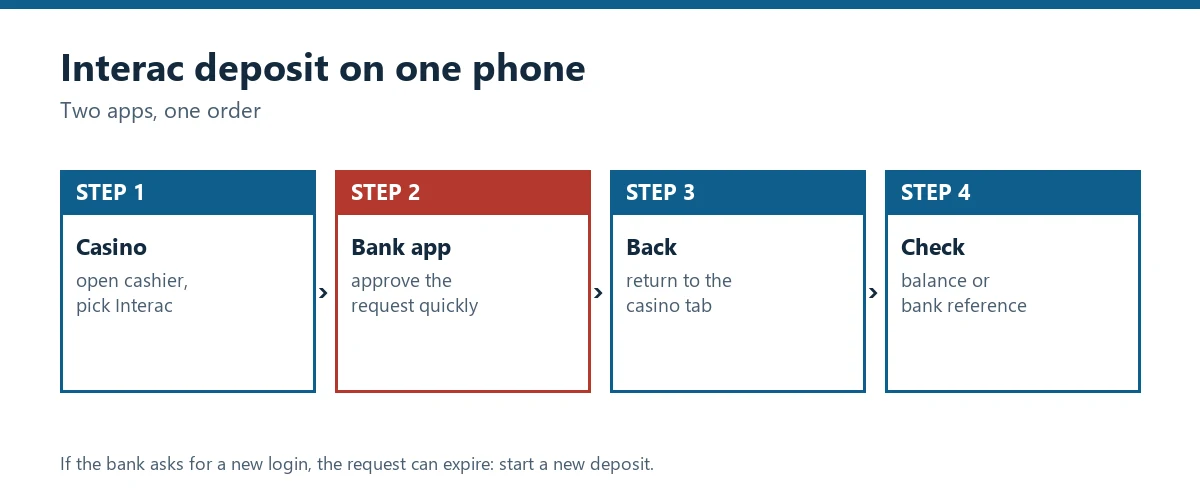
An Interac deposit on one phone
- Open the cashier in the casino and pick Interac.
- Enter the amount and your Interac-linked email or mobile number.
- Switch to your bank app. The payment request should appear there; approve it.
- Switch back to the casino. Do not close the casino tab; some cashiers wait for the confirmation.
- Check the balance. If it has not updated within a few minutes, refresh once and keep your bank reference.
The most common mobile problem is a timed-out request: the bank app asks for a new login, two-step check or update, and by the time you approve, the cashier has given up. If that happens, start a new deposit rather than approving an old request.
Open the cashier and send your first Interac e-Transfer.
Verification on a phone
Mobile is the easiest place to verify your account, because the camera is right there. A few rules from the terms we read:
- Photos, not scans. Hellspin does not accept scans or PDFs.
- Proof of address no older than 90 days. Hellspin and Slotsgem both set that limit.
- All four corners visible. Cropped documents are the most common reason for a second request.
Slotsgem also offers online verification through ShuftiPro, which runs in the phone's browser.
Playing on a small screen
Slots are built for phones now; live tables mostly are. Two habits help: set a deposit limit in the casino before you start, and turn off saved card details in the browser if someone else uses the phone. For bank-side safety, keep your e-Transfer send limit at a level that suits a mobile session, not your largest monthly bill.
Vave
4.9/5- Licence
- Curaçao OGL/2024/1676/0905 · Latcas B.V.
- Coins
- 90: BTC, ETH, USDT, LTC, DOGE, TON
- Withdrawal cap
- in instalments
Operating since 2022.
Hellspin
4.6/5- Licence
- not stated · Operating company not stated
- Coins
- 5: BTC, ETH, LTC, XRP, USDT
- Withdrawal cap
- €4,000 per day (clause 15)
Operating since 2021.
Slotsgem
4.2/5- Licence
- Curaçao OGL/2024/1676/0905 · Latcas B.V.
- Withdrawal cap
- not stated
Operating since 2024.
Ringospin
4.2/5- Licence
- Curaçao sublicence under Master Gaming Licence 5536/JAZ (as printed) · Terdersoft B.V.
- Withdrawal cap
- not stated
Launch year not published.
Ordered by year of launch, longest-running first.
Questions and answers
- Is there a casino app with Interac?
None of the casinos we read publishes an app in the App Store or Google Play. Several offer a web app you add to your home screen from the browser, for example Slotsgem with its 'Install App' option.
- How do I deposit by Interac on my phone?
Start the deposit in the casino, switch to your bank app to approve the e-Transfer request, and switch back. Do it within the time the cashier shows, or the request can expire.
- Can I verify my casino account on a phone?
Yes. Most casinos accept photos taken with the phone camera; Hellspin explicitly does not accept scans or PDFs, only photos.